Somfy-SDN Crestron Home™ driver

Price range: $200.00 through $340.00

Master your Somfy SDN shades with the definitive Crestron Home driver. This integration enables precise control over SDN, ILT2, and ST-30 motors, allowing you to manage individual shades or entire groups with ease. Experience smooth automation with support for custom positions, presets, and quick actions directly from your Crestron Home interface.

Please make sure to read below the full description of the driver before purchasing.

SKU: N/A Categories: ,

Description

The Somfy-SDN Crestron Home Driver bridges the gap between the Somfy Digital Network and your Crestron system. It manages communication via the processor’s COM port, providing a high-performance solution for both residential and commercial shade control.

Advanced Functionality:

  • Precision Control: Open, close, stop, and set custom positions or presets for every shade in your project.

  • Flexible Grouping: Control shades individually or across entire zones using motor or group addresses.

  • Intelligent Sequences: Trigger shade movements through scenes, keypad buttons, or handheld remotes with full sequence support.

  • System Persistence: Version 1.2.0 adds configuration saving to ensure your settings remain intact during system updates.

Technical Requirements & Setup:

  • Hardware Bridge: You must use an RS232-to-RS485 converter to connect the driver to the SDN hardware.

  • Motor Preparation: Configure all shade limits, IDs, and groups using Somfy’s SDN Motor Configuration Software before you begin the Crestron integration.

  • Protocol Support: This driver primarily supports the Somfy SDN v2 protocol, with limited support for earlier versions.

  • UI Strategy: We recommend creating a hidden room (e.g., ‘Rack’) to house the SDN communication driver. This keeps the user interface clean and organized.

Note: Please verify your hardware make and model. Check the hardware images on our site to ensure they match your devices. If your hardware differs substantially, the driver may not work. We strongly encourage you to take full advantage of the 2-hour trial period to verify compatibility before purchase.

Note: Due to the nature of this product, any and all sales are final, and NO refund will be issued. It is highly recommended and encouraged to use the built-in trial license to test the driver with your hardware setup before purchasing a full license. The trial period is 2 hours and can be extended another 2 hours by rebooting the processor.

Before calling, review the Driver help file and FAQ section for the Driver as our support is limited to questions about configuration and setup only. Any hardware configuration mentioned in the driver manual are the responsibility of the integrator. If you have hardware-related questions, such as wiring or addressing, we advise reaching out directly to the manufacturer for assistance. Additional support, beyond driver configuration, requires the purchase of service hours before guidance will be provided.

We reserve the right to make changes to this policy without notice.

Additional information

License

Somfy-SDN + 1 hour of live support, Somfy-SDN – Driver Only (email support only), Coupon – Driver Only

Reviews

There are no reviews yet.

Be the first to review “Somfy-SDN Crestron Home™ driver”

Your email address will not be published. Required fields are marked *

Downloads

Somfy_SDN_Manual

  • It is recommended that you save a configuration or golden configuration before installing any driver.

  • You don’t strictly need it if you use a COM port that supports RS-485 (such as COM 1 on the CP4R). However, if you use any other COM port that doesn’t support RS-485 (like on an NVX), than you will need an adapter.

  • Currently, we were able to successfully test using this DTECH adapter from Amazon. On a CP4R, we noticed that if you want to use COM 1, you will first need to select another COM port (such as COM 2) during install and then switch to COM 1. If you use any COM port other then 1, than you don’t need to do this. If you encounter any other adapters that work, you may let us know at drivers@digitalautomation.us. We’ll update this post as we encounter other adapters that have been reported with success.

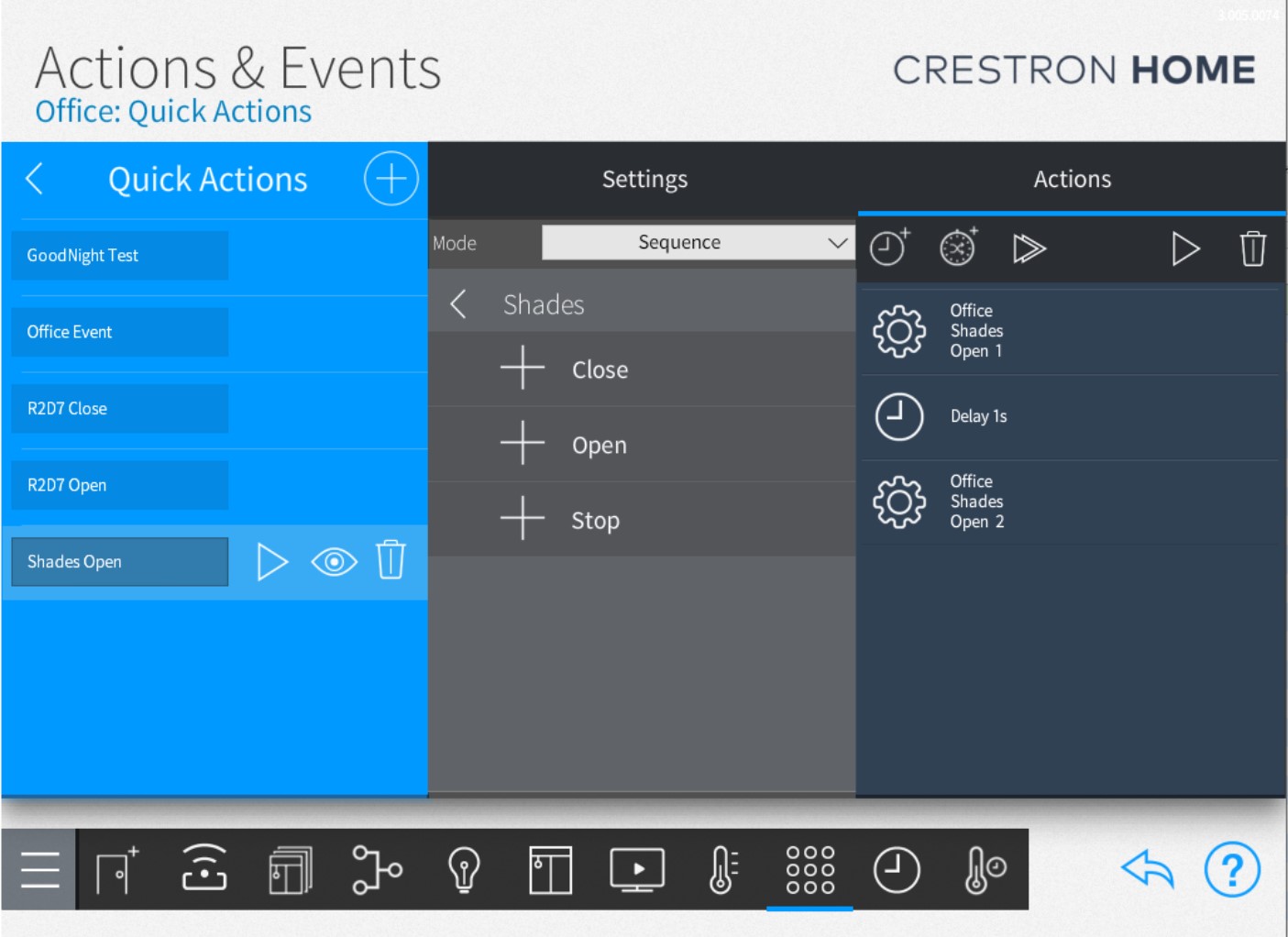
  • You can add shade controls to your Keypads by creating quick actions. You can add these quick actions to any room. Then chose to have them shown or not on the UIs by selecting and editing the property using the eye symbol next to the quick action.

    Then you can reference the quick action on any keypad as shown in the next snapshot.

  • On the RS232 side, from the processor, you connect tx from the processor to the rx on the adapter and rx on the processor side to tx on the adapter. Ground from the processor goes to ground on the adapter. On the RS485 side, you would wire the TX/RX+ from the adapter side, to the + on the Somfy transmitter and the TX/RX- from the adapter to the - on the Somfy transmitter. Although wiring RS485 ground is optional, it is recommended to connect ground from the adapter to ground on the device. The example image below shows how the wiring should look like between the adapter and the Somfy transmitter.

  • In order to control all or a group of shades at once, you will need to define a group in the SDN software and assign it a group address. If for some reason it’s not possible to define this group address, then an alternative is to define a quick action and add the shades you want to control to the quick action. The disadvantage of this option is that the shades will move in a staggered manner.

All search results